At Ceipal, every release is built around one goal: helping staffing teams work smarter, move faster, and deliver better outcomes for their candidates and clients. This release brings smarter AI controls, deeper integrations, more accurate billing, and meaningful workflow improvements across Ceipal ATS, Healthcare ATS, VMS, and Workforce Management.
Here's everything that's new.
Ceipal ATS Updates
Previous Interview Feedback Visibility Every interviewer now walks in with the full picture. Feedback from previous interview rounds is now visible alongside the current feedback form, giving interviewers the context they need to make better decisions without navigating away from the page.
Role-Based Access for Talent Bench Submissions The right people see the right submissions, nothing more, nothing less. Administrators can now control whether users view all submissions, only their own, or their team's directly from the Admin Panel. Better data protection, more flexible access control across different business models.
Advanced Monster Search Filters Find the right candidates on Monster without ever leaving Ceipal. Recruiters can now apply Monster-specific filters including Work Authorization, Career Level, Security Clearance, Years of Experience, and more — making candidate searches sharper and sourcing significantly faster.
Fieldglass User-Level Submission Attribution Every submission now shows exactly who made it. Recruiters can add their individual Fieldglass credentials directly from their profile, so submissions are recorded under their own account instead of a shared admin account. Cleaner reporting, accurate attribution, every time.
Employee Referral Submission Notifications New referrals get noticed the moment they come in. Administrators can now configure one or more recipients to be automatically notified whenever an employee submits a referral, keeping the review process moving without any manual follow-up.
PeopleStrong HRMS Integration Job requisitions from PeopleStrong now sync automatically into Ceipal ATS, eliminating manual job creation, ensuring data consistency, and allowing recruiters to start sourcing faster using the latest approved requisitions.
Ceipal Healthcare ATS Updates
Vidle Housing Integration Finding housing near an assignment no longer requires a separate search. Clinicians can now browse Vidle Housing options directly from the Career Portal or Cost Sheet Approval page in one click, and recruiters have the same visibility through the Job Posting Actions menu.
Guaranteed Hours—Now Built Into the Workflow Guaranteed hours can now be entered directly on the Job Posting and toggled on the Cost Sheet without leaving your existing workflow. Switch between guaranteed and actual-hour calculations instantly, with rates and margins recalculated each time.
OCONUS Per Diem Rates for Hawaii Assignments DoD OCONUS per diem rates for lodging and M&IE are now built directly into the pay package calculation workflow for Hawaii assignments, no manual lookups, no rate guesswork, and no compliance risk.
Reference Form Rule—Configurable by Job Type Reference form requirements can now be configured by job type directly within Client Assignment Settings. Candidates are only prompted to complete reference forms for the job types that require them, keeping the application process fast and relevant.
Submission Credential Details Now Visible Under Placements Documents, licenses, and certifications collected during submission are now displayed directly within the Placements section via two new tabs under Credential Management, no duplicate records, no navigating across sections.
Ceipal VMS Updates
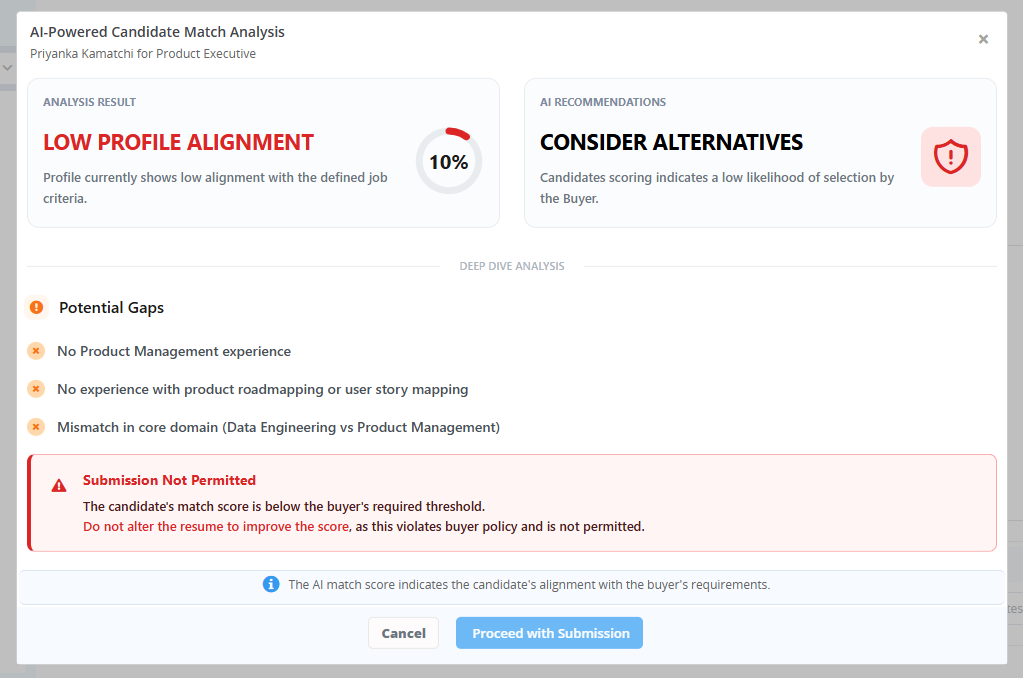
AI Submission Blocking Based on Threshold Score Buyers can now set a minimum AI match score to automatically prevent submissions that fall below it. Every candidate that enters your pipeline meets the bar you define, consistently and without manual review.
AI Submission Blocking Based on Threshold Score
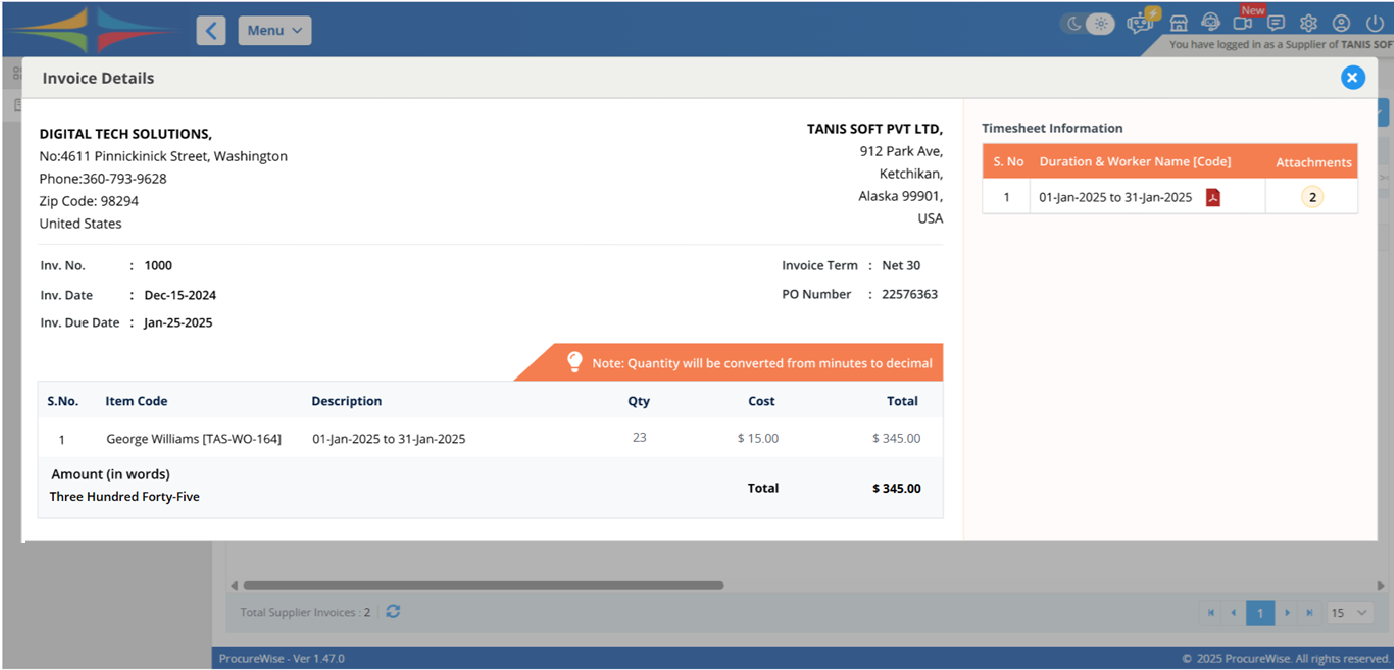
Configurable Supplier Invoice Fields—GST, PAN & Bank Details GST details, PAN, INR billing address, and default bank account information can now be configured centrally and automatically reflected across invoices, PDFs, emails, and payment screens, keeping billing accurate and GST-compliant without repetitive manual entry.
Configurable Supplier Invoice Fields—GST, PAN & Bank Details
Daily Bill Rate Support in Day-Wise Monthly Invoices Day-wise monthly invoicing now works seamlessly with Daily Bill Rate assignments. Ceipal calculates invoices from the assignment's daily rate and actual working days, with Daily and Monthly rate invoices grouped separately for cleaner billing visibility.
Daily Bill Rate Support in Day-Wise Monthly Invoices
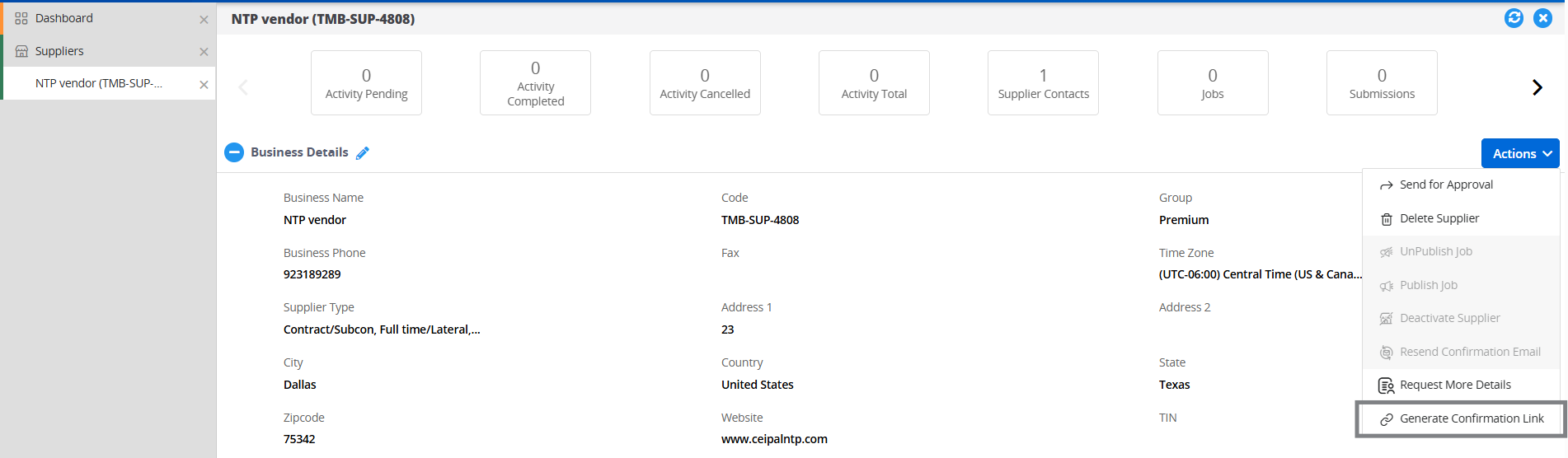
Generate Confirmation Link A confirmation link can now be manually generated directly from the Suppliers module and shared through any channel, keeping the vendor empanelment process moving regardless of automated email delivery.
Generate Confirmation Link
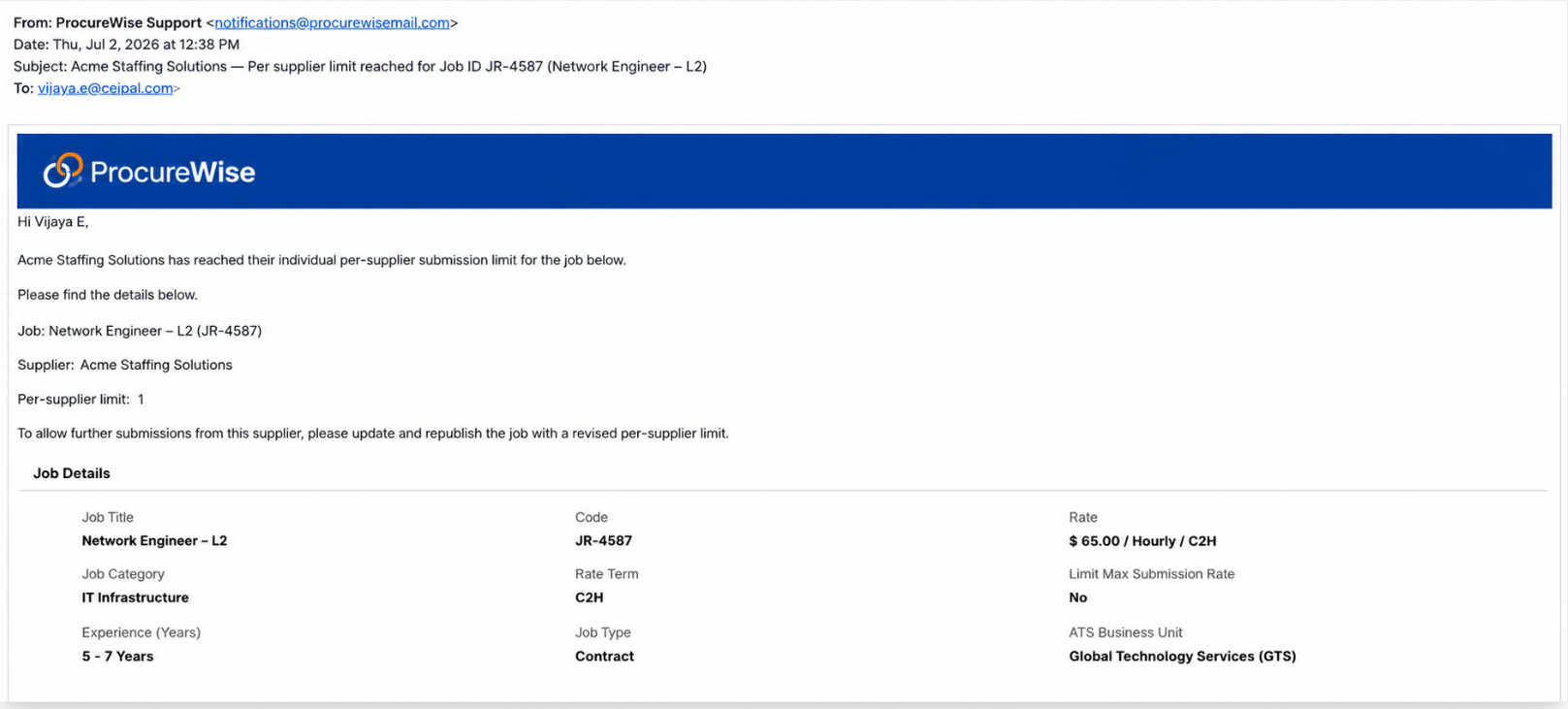
Max Submission Limit—Email and Toast Notifications Buyers are instantly notified when a supplier reaches their submission cap on a job. Suppliers also receive an in-app confirmation that the buyer has been notified, closing the communication loop without any back-and-forth.
Max Submission Limit—Email and Toast Notifications
Expanded Job Visibility & Auto-Publish on Submission Buyers can now extend job visibility to a wider set of suppliers using Admin settings, allowing suppliers to view and submit candidates directly without waiting on a manual publish step.
Expanded Job Visibility & Auto-Publish on Submission
Workforce Management Updates
Business Unit Transfer for Employees Administrators can now transfer employee profiles between Business Units directly within Workforce, with Business Unit validation during placement syncs keeping data clean and consistent across the board.
New Employment Type Conversion Flow When converting an employee's employment type, users can update the existing profile or create a new one. The current profile is marked as Exited and a new Active profile is created — preserving complete employment history without manual workarounds.
Bulk VMS Configuration Users can now view, search, and bulk configure active and archived employee records across supported VMS providers from one place, with built-in activity logs tracking every action for full auditability.
Open API Enhancements, Employees, Placements & Timesheets A new Add Timesheet API supports JSON-format submissions with validations and attachment support. Get Employees and Get Placements APIs now include additional filters, Placement Code, Job Code, and Placement Type, giving integration teams more precision when pulling data.
VMS Timesheet Field Configuration A new configuration option automatically maps Class and selected Custom Fields into timesheets at the point of VMS import, less manual field entry, more consistent timesheet data from the start.
All updates are live across your Ceipal accounts today. Log in and explore what's new, and reach out to your account manager if you need any help getting started.


-p-1080.png)