At Ceipal, every upgrade is built around one goal: helping staffing teams work smarter, move faster, and deliver better outcomes for their candidates and clients. This upgrade brings a conversational AI assistant, smarter compliance tools, deeper VMS connectivity, and meaningful workflow improvements across Ceipal ATS, Healthcare ATS, VMS, and Workforce Management.
Here's everything that's new.
Ceipal ATS Updates
SLA Engine—BI Reports Recruitment leaders now have deeper visibility into SLA performance. Two new BI reports, Applicant Submission SLA and User Performance SLA, help teams track submission timelines and analyze SLA adherence at the individual user level, making it easier to identify gaps and improve accountability.
E-Forms Email Notifications Enhancement Candidates receive one clean email, not a flood of separate notifications. When multiple E-Forms are initiated in a single transaction, the system consolidates them into one email with a full document list included. Users can preview the email before sending, keeping communication professional and organized.
Voice AI Interview—Decline Option Give candidates a respectful way to opt out and capture valuable feedback in the process. Candidates can now decline a Voice AI interview and select a reason with optional comments. Every rejection reason is captured in the Voice AI Interviews report, giving your team better visibility into candidate engagement and drop-off patterns.
Request More Details—Ceipal Engage Automated document requests now go out from your own email address, not a generic system address. Engage-triggered Request More Details emails now use the integrated email address configured in your system, keeping automated outreach consistent with your manual communications.
Interview Scheduling—5-Minute Time Intervals Start and End Time selections are now available in 5-minute intervals, giving recruiters the flexibility to set specific durations for different interview types without being locked into fixed time blocks.
Referral Portal Activation Using Work Email When activating the Referral Portal from a Placement record, users can now use the employee's work email, automatically saved to both the Referral Employee profile and the placement record for consistent contact information.
Field Sync from Job Posting to Placement Configure the fields that matter most and let them carry through automatically. Administrators can now configure which Job Posting fields are displayed when creating Confirmation and Placement records, keeping information consistent across the hiring lifecycle and eliminating the need for duplicate data entry.
Bulk Import Blacklist Recruiters and administrators can now blacklist multiple applicants in a single import, applying restrictions to a specific client or across all clients, saving time and improving data management.
Custom Email Templates Save time and stay consistent across every communication. Users can now create and manage customizable email templates for frequently used communications, available when using Compose Email, Job Share, and Send Hotlist within the Message Center, helping teams maintain professional, consistent outreach without starting from scratch every time.
Ceipal Healthcare ATS Updates
Candidate Timer—Missed Clock-In/Clock-Out Tracking Administrators can now configure alerts with grace periods, recipient lists, and notification frequency for missed clock-in and clock-out events. A Live Dashboard widget shows active-shift candidates who haven't clocked in — with a real-time counter showing how long they're late. A dedicated BI Report provides full historical visibility for tracking and audit purposes.
Definitive Healthcare Integration — Leads Module Users can now search for hospitals directly using Definitive Healthcare data within the Leads module, import matching records into Ceipal as leads, and convert them into clients — reducing manual data entry and accelerating pipeline development.
Placement Extension Report The new Placement Extension Report provides a row-by-row breakdown of each extension period, including rates, revenue, margin, and pay components, giving your team a clear picture of how placements evolve over time.
Placement Reports—Facility Location Placement Reports now include Facility State, City, Address, and ZIP Code fields with full filtering and grouping support, for more accurate workforce reporting based on the clinician's actual work location.
Facilities—Custom Label Configuration Administrators can now rename, show, hide, or mark Facility fields as mandatory or optional through Custom Labels in Admin Setup, giving teams greater flexibility over the Add/Edit Facility form across business units.
Business Unit Logo for Timesheet PDFs Timesheet PDFs now display the logo of the Business Unit associated with the placement. If no Business Unit logo is configured, the company-level logo is used as the default — keeping documents consistent and professional.
Field Sync from Job Posting to Placement Configure the fields that matter most and let them carry through automatically. Administrators can now configure which Job Posting fields are displayed when creating Confirmation and Placement records, keeping information consistent across the hiring lifecycle and eliminating the need for duplicate data entry.
Bulk Import Blacklist Recruiters and administrators can now blacklist multiple applicants in a single import, applying restrictions to a specific client or across all clients.
Custom Email Templates Save time and stay consistent across every communication. Users can now create and manage customizable email templates for frequently used communications available when using Compose Email, Job Share, and Send Hotlist within the Message Center, helping teams maintain professional, consistent outreach without starting from scratch every time.
Simplify VMS Integration Healthcare recruiters can now receive and manage Simplify VMS job requirements directly within Ceipal ATS- no manual job creation, no platform switching.
GoTo Integration—Calling & SMS The GoTo integration enables users to make calls and send SMS messages directly within the ATS using their existing GoTo account, keeping every conversation logged and accessible in one place.
Quantum Caliber Solutions VMS Integration Healthcare job requirements from Quantum Caliber Solutions VMS now flow directly into Ceipal ATS with email notifications when new jobs arrive so your team can act immediately.
Ceipal VMS Updates
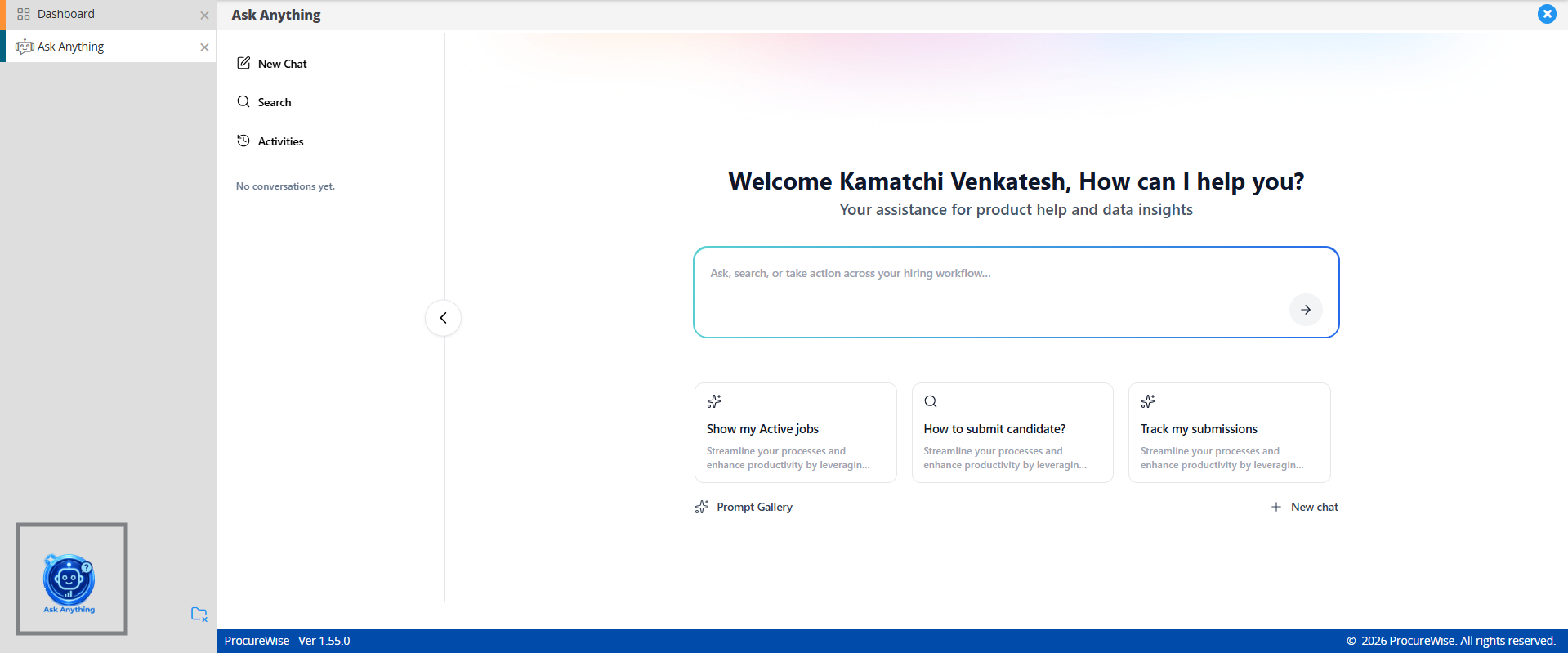
Ask Anything—AI Conversational Assistant Your entire workforce team now has instant access to the answers they need. Ask Anything is a natural-language assistant that allows authorized users to query their Ceipal VMS records in plain language, follow up within the same conversation, and view results in a sortable workspace table, all within their existing permissions.
Ask Anything Conversational Workspace
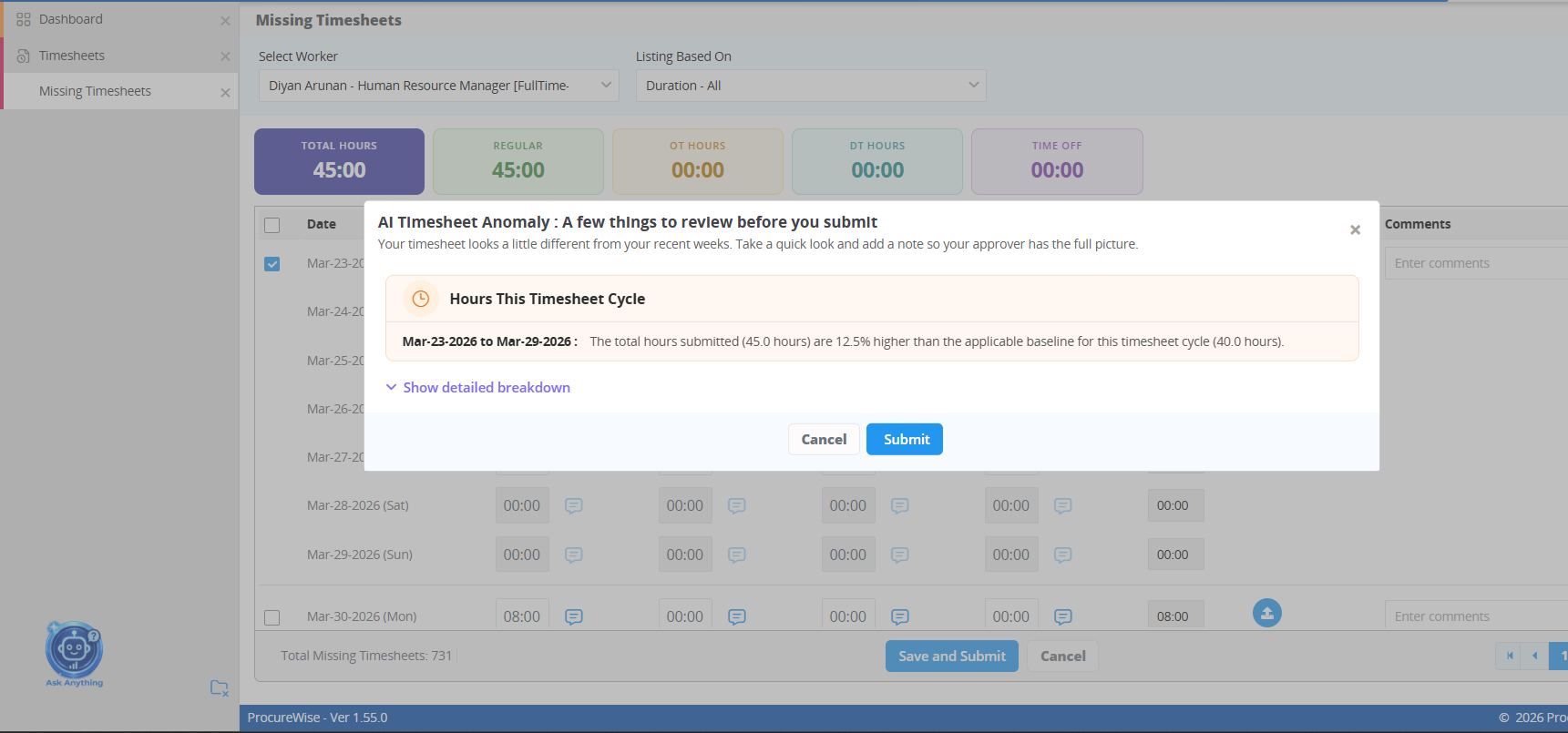
AI Timesheet Anomaly Detection When unusual patterns are detected in a worker's timesheet submission, the worker is prompted to add context before submitting, so approvers receive AI findings and worker explanations together, enabling faster and more informed decisions.
AI Timesheet Anomaly Review Popup
Candidate Submission Compliance Report The Candidate Submission Compliance Report breaks down total profiles into Submitted, Supplier, Skipped, and System Skipped with buyer-level filtering by supplier to review performance across the entire vendor network at a glance.
Document Center: Publish and Acknowledge Documents Buyers can now publish terms, policies, and instructions to the right supplier, worker, and MSP users with targeting by user type, country, vendor group, and effective dates. Set documents as read-only or require acknowledgement, with every view and confirmation tracked by version.
Contractor Type-Based Submission Documents Buyers and MSPs can configure submission documents specific to each contractor type — with mandatory rules enforced during submission and revision, so compliance requirements are always met without additional oversight.
Numeric and Clock Timesheet Hours Hours can now be entered and viewed in either decimal format or clock time (HH: MM), with the selected format carried consistently across approvals, emails, PDFs, and reports.
Full-Time Invoice Template & Custom Columns Buyers can now customize invoice descriptions, add columns mapped to work order fields like Cost Center, and configure display order, with all settings reflected consistently across invoice previews, PDFs, emails, and AP sync.
Configurable Vendor Email Events & Signatures Five key email events, including Submission Status Change and Interview updates, are now fully editable, with support for reusable signatures, text formatting, and customizable table fields, all previewable before saving.
Supplier Communication Email for Available Jobs A scheduled summary email automatically highlights new job openings and jobs closing soon, using supplier-specific data so each vendor sees only what's relevant to them.
Report Duration for Scheduled Tableau Reports A configurable Report Duration selection ensures every recurring delivery uses a defined reporting window, recalculated automatically at each run so teams always receive relevant, up-to-date insights.
Workforce Management Updates
Prowand (Magnit) API Integration for Timesheets Timesheet data from Prowand VMS now flows into Workforce through API integration—with worker and placement mapping, plus manual mapping and archive/restore support for unmatched or inactive records.
Download Timesheets from COVENDIS VMS Workforce now supports timesheet imports from COVENDIS—expanding VMS connectivity further with an on-premises approach configurable directly within Workforce.
Submit Timesheets in Day Format Teams working in day-based schedules can now submit and process timesheets in Day format—with day values automatically converted to hours based on your Default Hours Per Day configuration across reports and exports. Note: Available for India instance accounts. Additional module support will follow in subsequent phases.
Project-Level Task Management A new Project Tasks section within the Projects module lets users create and manage tasks specific to each project with options to mark tasks as mandatory for timesheet submissions, import from client records, and reflect them in associated placements.
All updates are live across your Ceipal products. Log in and explore what's new and reach out to your account manager if you need any help getting started.


-p-1080.png)